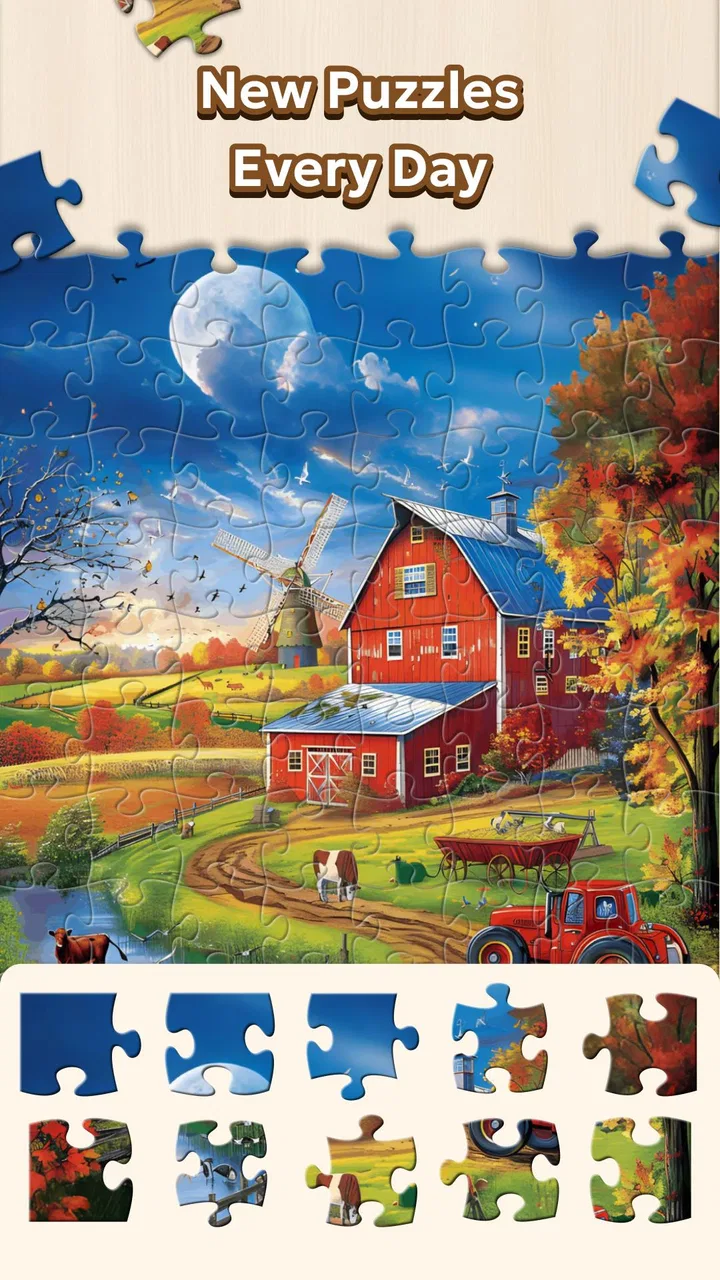
Jigsaw Puzzle - Countryside
- 4.6
- Rating
- 100.00K
- Installs
- Free
- Price

 Analysis by App-foxy
I spent time with Jigsaw Puzzle - Countryside as a quiet board-game alternative, and its appeal became clear almost immediately: it gives me a simple activity to return to when I want my attention occupied without the pressure of a timer, opponents, or complicated rules. The countryside theme also suits that mood. Rather than feeling like a competitive game, it feels closer to a digital puzzle book that I can open for a few minutes or settle into for a longer session.
That distinction matters. I would not choose this game when I want strategy, social play, or a strong sense of progression. I would choose it when I want to assemble an image at my own rhythm. Mint XX Games has positioned it as a free board game for a broad audience, with a large collection of jigsaw puzzles and daily play intended to be relaxing. My experience matched that basic purpose, although the practical value depends heavily on how much variety you want and how your device handles longer visual sessions.
How the game feels during ordinary play
The first thing I noticed was how little time it takes to understand the basic loop. You select a puzzle, begin arranging pieces, and gradually turn scattered fragments into a complete picture. There is no learning curve that gets in the way of the first session, which makes it suitable for someone who normally avoids games with elaborate menus or instructions.
You May Also Like

 Blood Strike: 2.5 Anniversary
Blood Strike’s Loadouts Turn Every Drop Into a Tactical Gamble
A close look at Blood Strike’s custom loadouts: how fast access to signature weapons reshapes its battle royale rhythm, rewards preparation, and narrows the gap between fights.

 Pandora - Music & Podcasts
Pandora’s Music Is Easy to Start, but Harder to Recover
Pandora’s strength is its low-effort path from a seed to a station. Its weak spot is how much confidence it asks you to place in connection, setup, and quiet recovery.

 8 Ball Pool
 Is Built on Rivalries, Rematches, and Routine
A close look at the rivalries, rematches, shared routines, and unanswered safety questions that turn a quick pool match into a persistent mobile community.

 Samsung Music
’s Quiet Strength Is Playing What You Already Own
Its reach comes less from spectacle than from dependable access to a personal library. That simplicity is both the app’s strongest retention engine and its ceiling.

 AccuWeather: Weather Radar
AccuWeather Review: A Quick, Clear Forecast for Everyday Decisions
For everyday plans, the best forecast is the one you can understand quickly. AccuWeather makes rain timing, radar, and local conditions easy to act on, with a few trade-offs.

 Hill Climb Racing
Why Hill Climb Racing Still Turns Crashes Into One More Run
A tiny car, a bumpy hill and one more upgrade: Hill Climb Racing keeps resurfacing because its simple chaos makes every near-miss feel personal.
More From Our News Desk
View All News


That simplicity is also the reason the game works well in short breaks. I can imagine opening it while waiting for an appointment, playing during a quiet commute, or using it at the end of the day when a more demanding game would feel like work. A puzzle can be paused mentally even when I have not finished it, because the task is easy to resume: look for an edge, identify a color group, or match a recognizable part of the scene.
The countryside setting gives the experience a softer identity than a collection built around abstract shapes alone. Natural scenery tends to create broad areas of similar color, though, and that introduces an important trade-off. A sky, field, or stretch of foliage can be pleasant to look at but slower to solve than a picture with sharp objects and strong contrast. I found that this can make the game relaxing, but it can also become repetitive if I am looking for constant visual surprises.
Speed expectations before you settle in
For this kind of game, perceived speed is less about rapid animation and more about how quickly I can move from choosing a puzzle to making useful progress. The uncomplicated format helps here. I am not spending time learning controls or waiting for a competitive match to fill. The experience is naturally paced by my own decisions, so it feels responsive when I am simply sorting pieces and testing placements.
There is a subtle difference between a game feeling calm and a game feeling slow. This one leans toward calm because the puzzle itself sets the tempo. If I am solving a scene with clear landmarks, progress feels immediate. If I am working through a large area of nearly identical grass or sky, the same interface can feel slower even though the game is behaving normally. That is a puzzle-design issue rather than a problem with speed, but it affects how energetic the session feels.
I would recommend starting with a picture that has distinct shapes instead of choosing the most visually attractive image immediately. That gives a better first impression because early matches are easier to recognize. Once I want a more meditative challenge, I can move to scenery with repeated textures. This small choice is one of the most useful ways to control the pace without needing a difficulty setting.
What happens during longer or heavier sessions
The game is easy to underestimate because the rules are so light. A short session may feel effortless, while a longer one can place more demand on my attention simply because I am examining many similar pieces. The heavy-use moment is not frantic gameplay; it is the point where I have been zooming into details, comparing shapes, and keeping track of several possible matches at once.
That is where screen size becomes important. On a phone, the puzzle can feel intimate and convenient, but small pieces may require more careful positioning. On a larger display, visual grouping is easier and the overall board is more comfortable to inspect. I would treat the device as part of the difficulty: the same countryside image can be relaxing on a larger screen and fiddly on a compact one.
Long sessions also make the visual design more significant. Bright, detailed images can keep me engaged, but they may be tiring if I am playing in a dim room or holding the phone close to my face. I prefer using it in short blocks, especially when the goal is to unwind rather than finish as quickly as possible. The game supports that habit naturally because a partially completed puzzle still feels like progress.
Another practical tip is to avoid treating every piece as an immediate placement. I get better results by first separating obvious edge pieces, then grouping pieces by broad color or texture. With countryside scenes, this prevents me from repeatedly trying similar green or blue pieces in random locations. It is a simple workflow, but it changes the game from aimless tapping into a more satisfying visual sorting exercise.
Reliability and recovering a paused session
A puzzle game needs to be dependable in a quiet, unglamorous way. I do not need it to react to multiplayer events or preserve a complex competitive ranking; I need it to let me return to a puzzle without turning a relaxing break into frustration. The straightforward format helps because there are fewer moving parts for me to manage during play.
My advice is still to treat a puzzle as an activity that benefits from deliberate pauses. If I know I am about to switch apps, answer a message, or put the phone away, I pause rather than relying on an abrupt exit. That is a sensible habit for any game, but it matters more here because the value is in maintaining a calm flow. Losing the context of a partly sorted image would be much more annoying than losing a quick arcade attempt.
The daily-game idea is useful for building a routine, but I would not make it the only reason to install the game. A daily prompt can encourage consistency, yet the broader puzzle collection is what gives the app lasting value. If I only play because I feel obligated to complete a daily task, the relaxing purpose starts to disappear. I prefer using the daily option as a gentle suggestion and choosing another image when my mood calls for something different.
There is also a recovery question that every puzzle player eventually faces: what should I do when I get stuck? I avoid repeatedly forcing the same piece into the same area. Instead, I zoom out mentally by looking for a stronger landmark, such as a fence, roofline, road, or color boundary. If the scene is mostly one texture, I take a break and return later. That approach protects the relaxing quality better than turning the puzzle into a test of patience.
Device limits, storage expectations, and comfort
The game supports devices running Android 6.0 or later, which makes it accessible to people using older Android hardware as well as newer phones. That broad compatibility is helpful, but it should not be confused with identical performance on every device. A newer phone may handle image-heavy browsing and extended play more comfortably, while an older model may feel less pleasant when many detailed images are being viewed in succession.
I would pay attention to practical comfort rather than chasing maximum visual quality. A stable grip, enough screen brightness, and a display large enough to distinguish piece shapes matter more to me than playing for hours. If the phone has limited free space, I would also keep an eye on general storage because a large image library can make any visual app less convenient to maintain, even when the game itself is free to install.
The free entry point is a clear advantage for casual players. I can try the core experience without committing money first. At the same time, in-app purchases range from $4.99 to $29.99 per item, so I would be careful around optional spending. Before buying anything, I would decide whether I am paying for a specific improvement to my own routine or simply reacting to the desire for more content in the moment.
This is particularly important for families. The content rating is Everyone, which makes the game broadly approachable, but an age rating does not automatically mean every purchasing decision is suitable for every household. If a child uses the device, I would keep purchase controls in mind and make the free experience the default. The calm format is family-friendly, yet spending boundaries are still worth setting before handing over the phone.
Who will enjoy it, and who should choose something else
I think the best audience is someone who likes traditional jigsaw puzzles but wants a portable version without pieces getting lost. It also suits people who enjoy low-pressure board games, visual sorting, and small routines that help them disconnect from more demanding screens. Someone who wants a peaceful activity before bed or during a break may appreciate the lack of urgency.
It can also work for a person returning to games after a long break. There is no need to memorize a plot, understand a character build, or compete with a more experienced player. The challenge is visible and self-contained. I could hand it to a relative who enjoys puzzles on a table, provided that person is comfortable using a touchscreen and the device is large enough for clear interaction.
I would skip it if my main goal is deep strategy. A traditional board-game app with opponents, resource management, or meaningful tactical choices would offer more variety in decision-making. I would also look elsewhere if I need social interaction, because assembling a picture alone is the central experience. Likewise, players who dislike repeated visual textures may find countryside scenes slower and less rewarding than puzzle collections built around objects, architecture, or bold illustrations.
Compared with a physical jigsaw, this version wins on portability and convenience. I do not need a table, a box, or a way to protect an unfinished picture from being disturbed. The physical alternative still offers a stronger sense of touch and a more natural view of every piece, so dedicated puzzle fans may prefer the real thing for weekend sessions. Compared with a generic digital puzzle app, the countryside focus gives this game a clearer mood, but it may feel narrower if I want many unrelated themes.
Useful habits that improve the experience
My first practical recommendation is to choose the session length before choosing the image. For a five-minute break, I would pick a scene with obvious contrast and recognizable objects. For a slower evening, I would choose a landscape with repeated colors and accept that the challenge will come from careful observation. Matching the puzzle to the available time prevents a relaxing game from becoming an unfinished obligation.
My second recommendation is to use visual anchors rather than relying only on piece shape. A small color transition, a line in a building, or the edge of a distant object can provide more information than the tab-and-slot outline. This is especially valuable in countryside scenes, where many pieces may share a similar green or blue background. I find that identifying one unusual mark often unlocks a whole group of placements.
Third, I would separate “difficult” from “unpleasant.” If a puzzle is challenging because it asks me to notice subtle details, that can be rewarding. If I am straining to see pieces because the display is too small or the lighting is poor, the problem is my setup rather than the puzzle. Adjusting the phone position, taking a break, or moving to a larger device can make the same image feel fairer without changing the game.
Finally, I would avoid judging the whole collection from one session. The mood of an individual image has a large effect on the experience. A peaceful landscape may be exactly right one day and too repetitive the next. The strongest use of this game is as a flexible shelf of small activities, not as a single challenge that must entertain me continuously for hours.
My performance verdict
After using it as both a quick distraction and a longer visual activity, I see Jigsaw Puzzle - Countryside as a focused, low-pressure board game rather than a demanding all-purpose gaming app. Its perceived speed is governed by the puzzle I choose, its heavier moments come from extended visual concentration, and its broad Android support makes it approachable on older devices. The experience is most comfortable when I treat it as a calm session instead of expecting constant stimulation.
The game has earned a 4.7 average from around 5.2 thousand ratings, with more than 100 thousand installs, which fits the appeal I felt: it is easy to understand and easy to revisit. Mint XX Games keeps the concept direct, and the current version is 1.1.2. Because it is free to start, I think trying it is reasonable for anyone curious about digital jigsaws, while the optional purchase range means I would keep spending intentional.
My honest recommendation is conditional but positive. Install it if you want portable countryside-themed puzzles, flexible sessions, and a gentle way to focus your mind. Start with a visually clear image, learn how to group pieces by texture, and use the daily option as a prompt rather than a duty. Choose a physical puzzle or a more strategic board game instead if tactile pieces, competition, or complex decisions are what keep you engaged.
For me, the strongest quality is not that it tries to be everything. It knows that a jigsaw can be useful precisely because it asks for one kind of attention and little else. When my phone is set up comfortably and I choose an image that matches my available time, the game delivers a genuinely relaxing pause. That makes it a good fit for quiet routines, not for players searching for high-speed action or deep tactical variety.
FAQs for Jigsaw Puzzle - Countryside
01What are the main features of Jigsaw Puzzle - Countryside?
Jigsaw Puzzle - Countryside offers a wide variety of picturesque countryside scenes to piece together. Each puzzle is designed with high-resolution images and offers multiple difficulty levels to suit both beginners and seasoned puzzle enthusiasts. The app also includes a rotation mode for added challenge and a helpful preview feature to assist users as needed.
02Is Jigsaw Puzzle - Countryside suitable for children?
Yes, Jigsaw Puzzle - Countryside is suitable for children. The app includes simpler puzzles with fewer pieces, making it accessible for younger players. Additionally, the app has a child-friendly interface and parental controls to ensure a safe and enjoyable experience for kids. It’s a great way to improve problem-solving skills and hand-eye coordination.
03Does Jigsaw Puzzle - Countryside require an internet connection to play?
Jigsaw Puzzle - Countryside does not require a constant internet connection to play. Once the app is downloaded, users can enjoy puzzles offline. However, an internet connection may be needed for initial setup, updates, or to download additional puzzle packs. This makes it perfect for traveling or areas with limited connectivity.
04Are there in-app purchases in Jigsaw Puzzle - Countryside?
Yes, Jigsaw Puzzle - Countryside offers in-app purchases. Users can buy additional puzzle packs or unlock special features to enhance their experience. While the app provides a variety of free puzzles, purchasing additional content can offer more diverse scenes and increased challenges for dedicated puzzle fans.
05How does Jigsaw Puzzle - Countryside handle user privacy and data?
Jigsaw Puzzle - Countryside prioritizes user privacy by adhering to standard data protection practices. The app collects minimal personal information necessary for functionality and user support. Users can review the privacy policy within the app settings to understand how their data is managed and ensure their information remains secure.
Pros
- Beautiful
- high-quality images enhance the experience.
- Variety of difficulty levels for all players.
- User-friendly interface with intuitive controls.
- Offline mode available for uninterrupted play.
- Regular updates introduce new puzzles.
Cons
- Limited free puzzles available initially.
- Ads can be intrusive during gameplay.
- Large app size may affect storage space.
- In-app purchases necessary for more puzzles.
- No multiplayer or social sharing features.

Jigsaw Puzzle - Countryside
Gallery